Back to SiteWorx (Control Panel)
You can access the FTP account using the SiteWorx login details, which gives you full access to the home directory. However, if you want to create an FTP user account for a specific directory, you should create a separate FTP account.
1. Log in to your SiteWorx account.
2. In the FTP section, click on Add an FTP Account.
3. Enter the following details:
- FTP Username: The FTP username you would like to use, such as John. Choose the appropriate domain from the drop-down menu in case of multiple domains.
- Password: Enter a password, or click on Magic Wand to generate one.
- Home Directory: Leave this as it is.
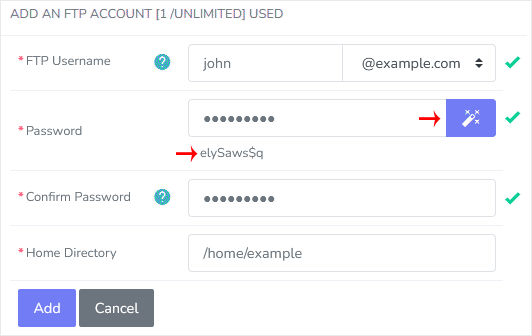
4. Click on Add.
You can now access your new FTP account from the FTP client. The details are given below.
- Host: The IP address or the name of your website, such as ftp.example.com (replace example.com with your website address).
- Username: John@example.com.
- FTP Port: 21 (Default port is 21).
- FTP Password: Your FTP Password.