Back to Cloudflare (cPanel)
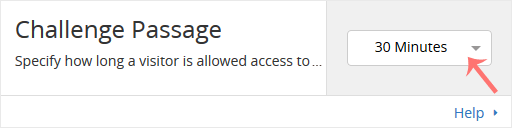
Cloudflare protected websites display captcha to visitors to prevent bad bots and malicious activity. You can specify the allowed time for visitors who complete the page challenge.
However, you should pay attention that, if the visitor's IP reputation is bad, but he is genuine, he can get annoyed by frequently filling captcha.
1. Log in to your cPanel account.
2. In the Software section, click on Cloudflare.

3. Click on Sign in Here to access your Cloudflare account.

4. Click on Settings in the menu.
5. In front of Challenge Passage, you can see the drop-down menu. Choose the appropriate time from the drop-down menu, and your settings will be automatically saved.